
Chapter 2: Atoms and Chemical Bonding#

1. Introduction#

Welcome to the foundational principles of chemistry in drug design. In this section, we will explore how atoms and chemical bonding is fundamental to drug discovery. Every drug molecule is composed of atoms held together by chemical bonds, and the nature of these bonds determines:

  • Molecular stability - Will your drug compound survive in biological conditions?

  • Reactivity - How will it interact with biological targets?

  • Physical properties - Solubility, membrane permeability, binding affinity

  • Structure-activity relationships - Why small changes dramatically affect drug efficacy

In this module, you’ll learn the chemistry underlying molecular structure and use computational tools to explore these concepts in real drug molecules.


2. Key Concepts and Definitions#

  • Atom: The smallest unit of matter consisting of a nucleus (protons + neutrons) and electrons.

  • Valence Electrons: Electrons in the outermost shell that participate in bonding.

  • Chemical Bond: An attractive force holding atoms together in molecules.

  • Electronegativity: The ability of an atom to attract shared electrons (Pauling scale: F = 3.98, most electronegative).

  • Polarity: Unequal distribution of electron density in a bond or molecule.


3. Main Content#

3.1 Atomic Structure and Valency#

Atoms consist of a nucleus surrounded by electrons arranged in shells. The outermost electrons is called the valence electrons.

The number of covalent bonds an atom typically forms is determined by how many valence electrons it needs to achieve a stable octet (8 electrons in the outer shell).

This is calculated by subtracting the group number from 8, which directly predicts the bonding capacity of main group elements.

For example,

  • Chlorine atom is in Group 7 of the Periodic Table

  • Therefore, it has 7 valence electrons

  • To achieve a stable octet, it needs 1 more electrons

  • So, it can form 1 bond with other atoms
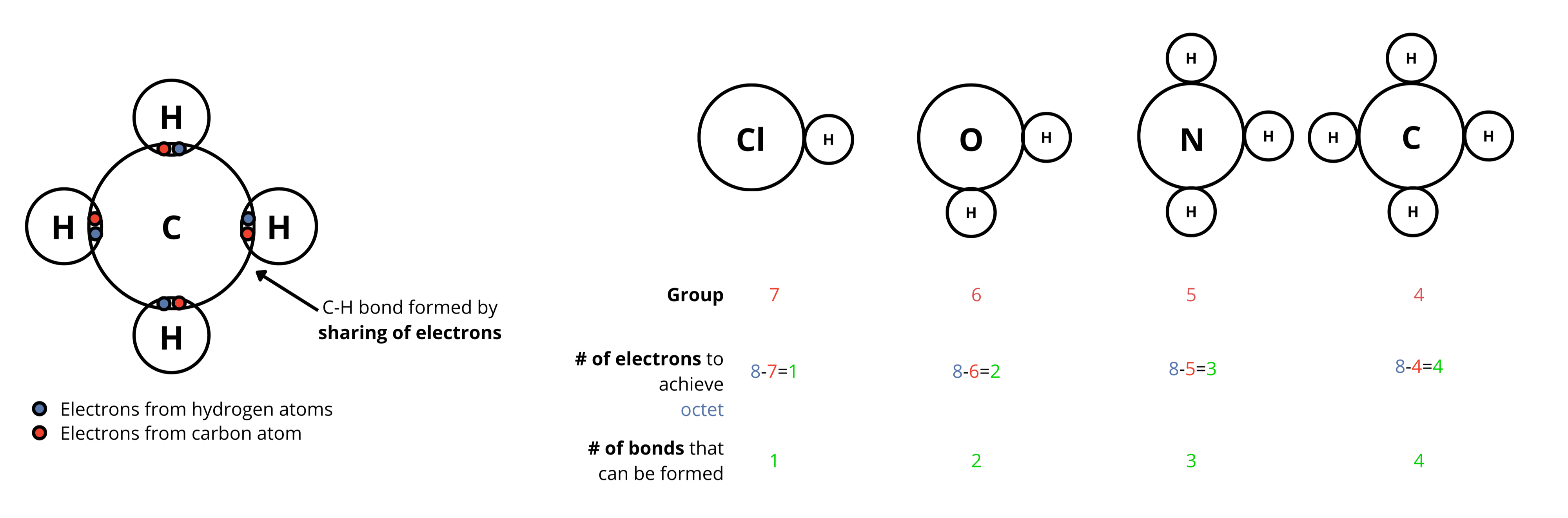
Valency and bonds

3.2 Covalent bonds#

Covalent bonds form when atoms share electron pairs. These are the strongest bonds in organic molecules and define the molecular skeleton.

Types of covalent bonds:

  • Single bond: e.g. C-C, C-O, C-N

  • Double bond: e.g. C=O, C=C

  • Triple bond: e.g. C≡N, C≡C

Bond strength order: Triple > Double > Single (affects molecular stability and reactivity)

Hide code cell source

from rdkit import Chem
from rdkit.Chem import AllChem
from rdkit.Chem import Draw
from IPython.display import display, HTML
import json
import uuid

# --- 1. Define Drug Data (SMILES and Description) ---
drug_data = {
    'Aspirin': {
        'smiles': 'CC(=O)Oc1ccccc1C(=O)O', 
        'desc': 'A non-steroidal anti-inflammatory drug (NSAID) used to reduce pain, fever, and inflammation.'
    },
    'Paracetamol': {
        'smiles': 'CC(=O)Nc1ccc(O)cc1', 
        'desc': 'A common medication used to treat mild to moderate pain and fever.'
    },
    'Ibuprofen': {
        'smiles': 'CC(C)Cc1ccc(C(C)C(=O)O)cc1', 
        'desc': 'An NSAID used for treating pain, fever, and inflammation. It works by inhibiting cyclooxygenase (COX) enzymes.'
    },
    'Caffeine': {
        'smiles': 'Cn1cnc2c1c(=O)n(C)c(=O)n2C', 
        'desc': 'A central nervous system stimulant associated with alertness and preventing tiredness.'
    },
    'Penicillin G': {
        'smiles': 'CC1(C(N2C(S1)C(C2=O)NC(=O)Cc3ccccc3)C(=O)O)C', 
        'desc': 'An antibiotic used to treat a wide variety of bacterial infections.'
    }
}

# --- 2. Generate 2D and 3D structures ---
pdb_structures = {}
svg_structures = {}
descriptions = {}

for name, data in drug_data.items():
    # Create the molecule object from SMILES
    mol = Chem.MolFromSmiles(data['smiles'])
    
    if not mol:
        print(f"Error generating molecule for {name}")
        continue

    # Store the description
    descriptions[name] = data['desc']

    # A. Generate 2D SVG structure
    drawer = Draw.MolDraw2DSVG(380, 380)
    # Set some drawing options for better visuals
    opts = drawer.drawOptions()
    opts.clearBackground = False
    drawer.DrawMolecule(mol)
    drawer.FinishDrawing()
    svg = drawer.GetDrawingText()
    svg_structures[name] = svg
    
    # B. Generate 3D PDB structure
    mol_3d = Chem.AddHs(mol) # Add Hydrogens for accurate 3D geometry
    
    # Embed molecule (calculate 3D coordinates)
    # ETKDGv3 is a robust method for embedding small molecules
    embed_status = AllChem.EmbedMolecule(mol_3d, AllChem.ETKDGv3())
    
    # If embedding fails (return code -1), try random coordinates as fallback
    if embed_status == -1:
        AllChem.EmbedMolecule(mol_3d, useRandomCoords=True)
        
    # Optimize geometry (optional but recommended)
    AllChem.MMFFOptimizeMolecule(mol_3d)
    
    # Store PDB block
    pdb_structures[name] = Chem.MolToPDBBlock(mol_3d)

# --- 3. Prepare HTML and JavaScript ---

# Create unique IDs
unique_id = str(uuid.uuid4())[:8]
viewer_3d_id = f"viewer_3d_{unique_id}"
viewer_2d_id = f"viewer_2d_{unique_id}"
desc_id = f"desc_{unique_id}"
buttons_id = f"buttons_{unique_id}"

# Serialize data to JSON
structures_pdb_json = json.dumps(pdb_structures)
structures_svg_json = json.dumps(svg_structures)
descriptions_json = json.dumps(descriptions)

# Generate HTML Buttons
buttons_html = ''.join([
    f'<button onclick="window.showDrug_{unique_id}(\'{name}\')" '
    f'style="margin: 4px; padding: 8px 12px; border-radius: 5px; border: 1px solid #ccc; background-color: #eef; cursor: pointer; font-weight: bold;">{name}</button>'
    for name in drug_data.keys()
])

# HTML Layout
html_code = f"""
<div style="font-family: sans-serif; max-width: 850px;">
    <div id="{buttons_id}" style="margin-bottom: 15px; text-align: center;">
        {buttons_html}
    </div>
    
    <div id="{desc_id}" style="background-color: #f9f9fa; padding: 10px; border-left: 4px solid #007bff; margin-bottom: 15px; border-radius: 4px; min-height: 40px;">
        Select a drug to see its description.
    </div>

    <div style="display: flex; flex-direction: row; justify-content: space-between;">
        
        <div style="width: 48%;">
            <div style="text-align: center; font-weight: bold; margin-bottom: 5px;">2D Structure (Chemical Graph)</div>
            <div id="{viewer_2d_id}" style="width: 100%; height: 400px; border: 1px solid #ddd; border-radius: 8px; display: flex; align-items: center; justify-content: center; background-color: white;">
                </div>
        </div>
        
        <div style="width: 48%;">
             <div style="text-align: center; font-weight: bold; margin-bottom: 5px;">3D Conformer</div>
             <div id="{viewer_3d_id}" style="width: 100%; height: 400px; position: relative; border: 1px solid #ddd; border-radius: 8px;"></div>
        </div>
    </div>
</div>

<script>
    (function() {{
        // Parse JSON data from Python
        const structures_pdb = {structures_pdb_json};
        const structures_svg = {structures_svg_json};
        const descriptions = {descriptions_json};
        
        let viewer_3d = null;
        const viewer_2d = document.getElementById('{viewer_2d_id}');
        const desc_div = document.getElementById('{desc_id}');
        
        // Check for 3Dmol
        let scriptLoaded = typeof $3Dmol !== 'undefined';
        
        function init3DMol() {{
            try {{
                viewer_3d = $3Dmol.createViewer(
                    document.getElementById('{viewer_3d_id}'),
                    {{backgroundColor: 'white'}}
                );
                
                // Global function to switch drugs
                window.showDrug_{unique_id} = function(name) {{
                    if (!viewer_3d || !viewer_2d) return;
                    
                    // 1. Update Description
                    desc_div.innerHTML = '<strong>' + name + ':</strong> ' + descriptions[name];
                    
                    // 2. Update 2D SVG
                    viewer_2d.innerHTML = structures_svg[name];
                    
                    // 3. Update 3D Viewer
                    viewer_3d.clear();
                    viewer_3d.addModel(structures_pdb[name], 'pdb');
                    
                    // Style: Sticks for bonds, Sphere for atoms
                    viewer_3d.setStyle({{}}, {{
                        stick: {{radius: 0.2, colorscheme: 'Jmol'}},
                        sphere: {{scale: 0.3, colorscheme: 'Jmol'}}
                    }});
                    
                    viewer_3d.zoomTo();
                    viewer_3d.render();
                }};
                
                // Initialize with the first drug in the list
                const firstDrug = Object.keys(structures_pdb)[0];
                if(firstDrug) window.showDrug_{unique_id}(firstDrug);
                
            }} catch(e) {{
                console.error('Error initializing 3Dmol:', e);
            }}
        }}
        
        // Load script if needed
        if (scriptLoaded) {{
            init3DMol();
        }} else {{
            const script = document.createElement('script');
            script.src = 'https://3Dmol.csb.pitt.edu/build/3Dmol-min.js';
            script.onload = init3DMol;
            document.head.appendChild(script);
        }}
    }})();
</script>
"""

display(HTML(html_code))
Select a drug to see its description.
2D Structure (Chemical Graph)
3D Conformer

3.3 Electronegativity and Bond Polarity#

Different atoms have different electronegativities. Electronegativity refers to ability of an atom to pull and electron toewards itself. The electronegativity of an atom can be expressed in terms of Pauling scale values.

For example, fluorine has an electronegativity of 3.98 on the Pauling scale, while carbon has an electronegativity value of 2.55. Therefore, fluorine is more electronegative than carbon.
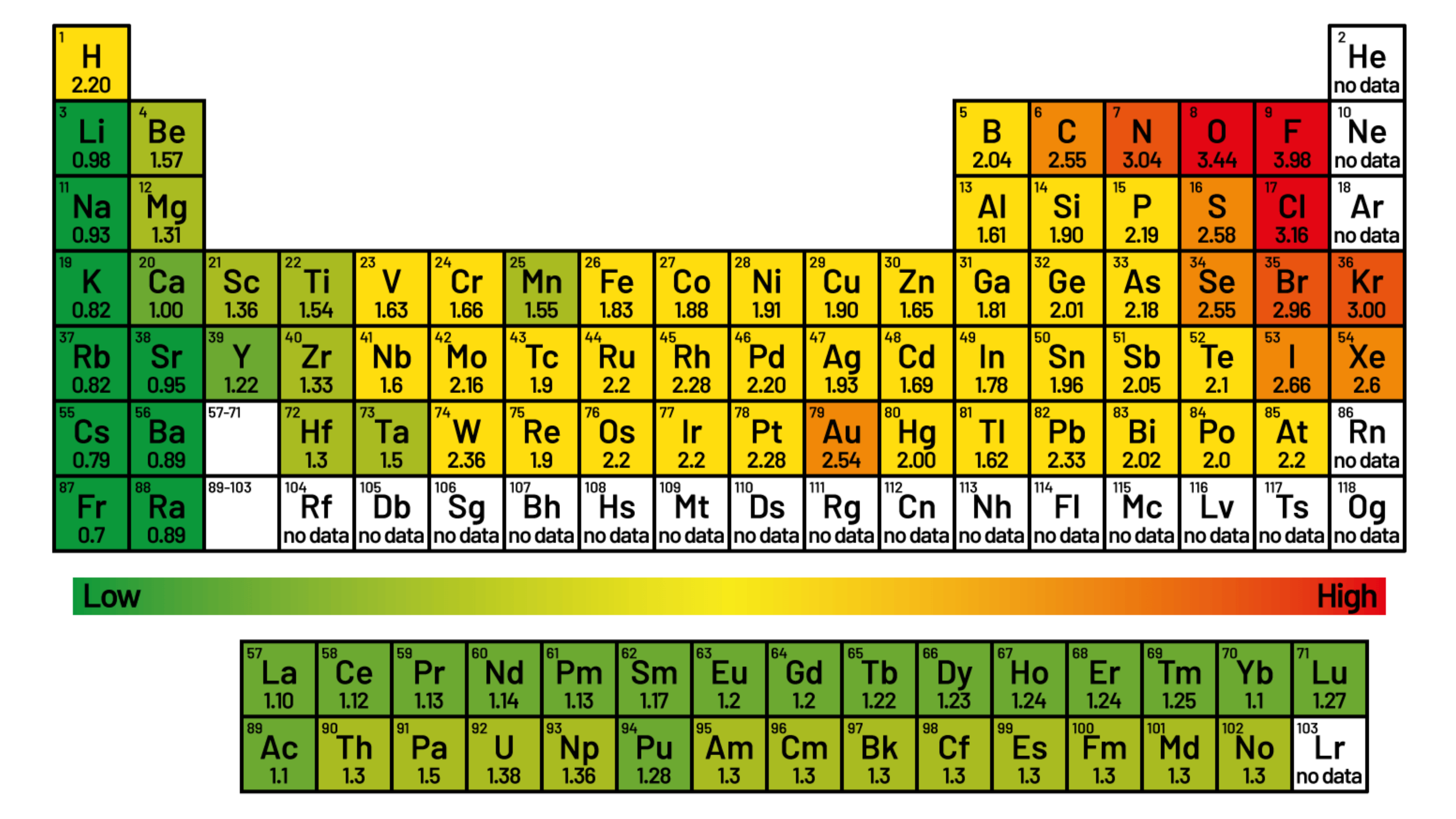
Electronegativity in Pauling Scale Image adapted from source

Although covalent bonds are formed by shared electrons, the electronegative atom would pull the shared pair of electrons towards itself. In such instance, a polar bond is formed
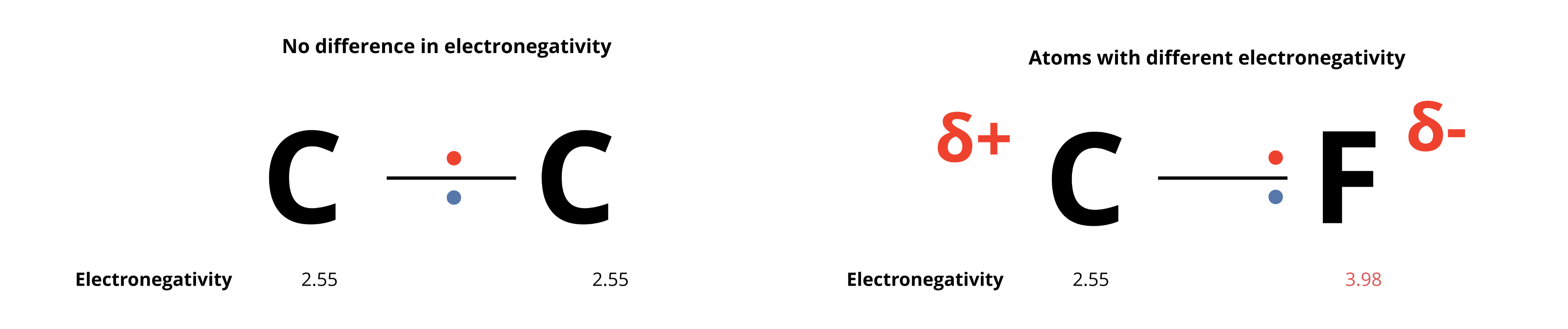
Polar bonds

3.2 Ionic Bonds: Improving Solubility#

Ionic bonds are electrostatic attractions between a positively charged ion (cation) and a negatively charged ion (anion).

It is formed through complete electron transfer, creating charged species (ions).
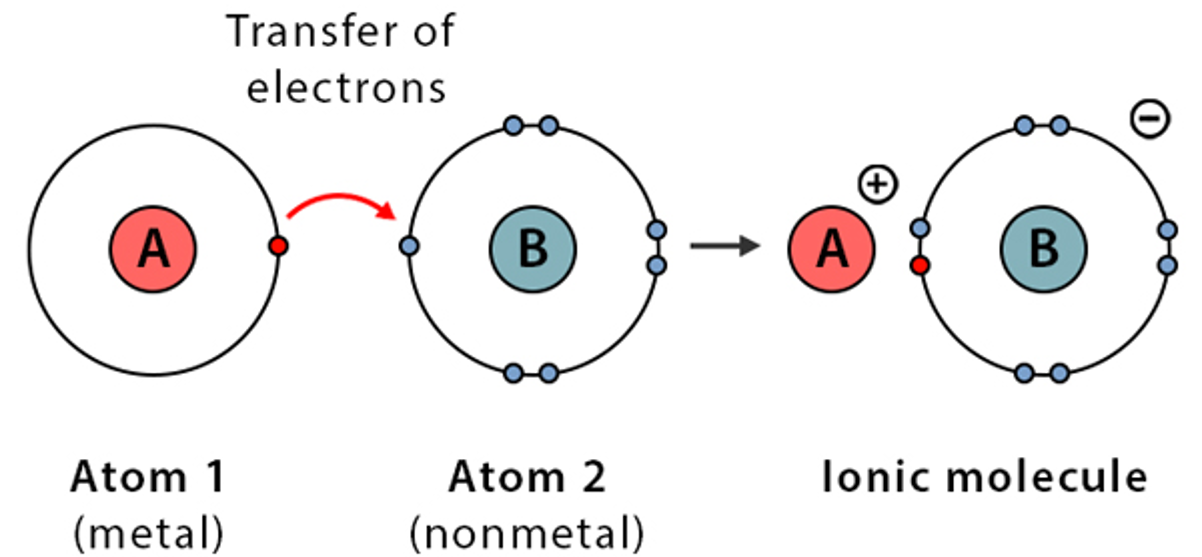
Ionic bonds

Image adapted from source

While covalent bonds form the drug itself, ionic bonds are often introduced to turn a drug into a salt.

This strategy is widely used to improve a drug’s poor water solubility, as the resulting charged ions can form favorable interactions with polar water molecules, enhancing absorption into the bloodstream.

  • Example: Propranolol HCl Propranolol contains a basic amine group. In the presence of hydrochloric acid (HCl), this amine is protonated to form a positively charged cation. This cation then forms an ionic bond with the negatively charged chloride anion (Cl⁻). The resulting salt, Propranolol HCl, is far more water-soluble than the original propranolol molecule, making it suitable for oral administration.


4. Summary and Key Takeaways#

In this section, we’ve explored the critical roles of covalent and ionic bonds in pharmacology. We learned that the very essence of a drug’s identity and behavior is encoded in these chemical connections. Covalent bonds provide the strong, stable scaffold essential for a drug’s structure and metabolic resilience, while ionic bonds are a key tool for manipulating physical properties like solubility to ensure a drug can reach its target effectively.

  • Covalent bonds form the stable, resilient core of a drug molecule.

  • Ionic bonds are used to create salts, which typically enhance a drug’s water solubility and bioavailability.

  • Understanding bond types allows you to predict a drug’s properties and potential for modification.